IPTV for Chromecast with Google TV: The Proven Buyer's Guide 2026
Fix Slow Channel Switching on Chromecast with Google TV using Sparkle TV. Our guide helps you save money on premium content in 2026. Start watching instantly!
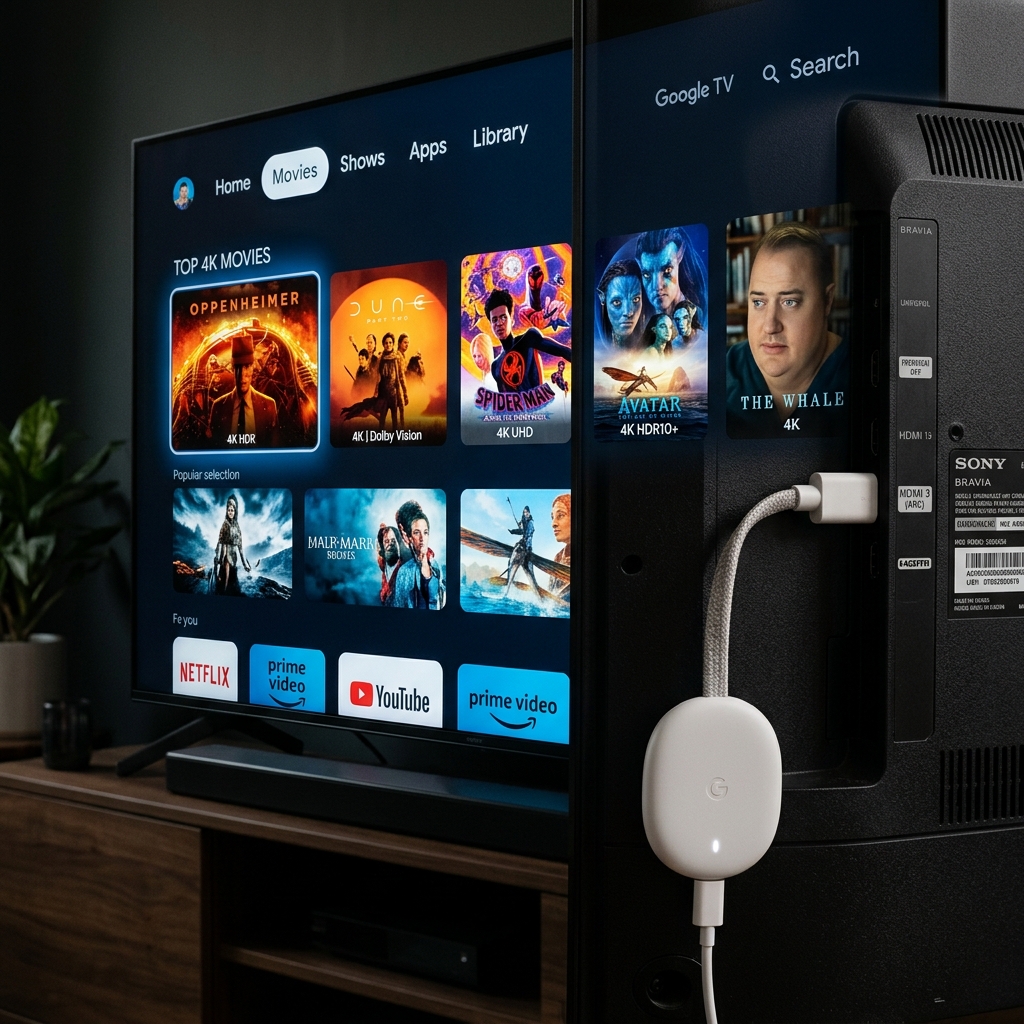
Chromecast with Google TV is Google’s most capable streaming dongle — a $50 device that runs full Android TV, supports 4K HDR, and installs apps directly from the Google Play Store. In the USA and Canada, it has become one of the most popular IPTV devices because it connects to any TV via HDMI and requires zero setup beyond plugging it in. Sparkle TV is the ideal IPTV app for Google TV’s interface — and when paired with a quality provider, it delivers Multi-screen streaming across your entire household with complete ISP throttling bypass. Ensure your streams are stable by reviewing our Fix IPTV Buffering Guide.
This guide covers the honest pros and cons of IPTV on Chromecast with Google TV, the privacy configuration that North American users need, and the complete fix for Slow Channel Switching.
Sparkle TV: Why It Works on Chromecast with Google TV
Sparkle TV is available directly from the Google Play Store on Chromecast with Google TV, designed specifically for Google TV’s large-screen navigation paradigm. Its advantages for North American users:
- Xtream Codes API support — full provider integration with EPG, VOD, and live TV from a single connection
- Multi-screen streaming support — household accounts can authorize multiple Chromecast devices under one subscription
- VPN pass-through — all traffic routes through any system-level VPN without app-level configuration
- Adaptive bitrate engine — adjusts stream quality automatically for variable US/Canadian broadband connections
- Full EPG grid — US/Canadian programme guide with sports schedules, primetime TV, news
IPTV on Chromecast with Google TV: Full Pros and Cons
PROS
| Advantage | Detail |
|---|---|
| Native Google Play Store install | Sparkle TV installs in 60 seconds — no sideloading |
| 4K HDR output | Chromecast with Google TV handles 4K/60Hz HDR10+ natively |
| Multi-screen streaming | Multiple Chromecast dongles on one subscription — one for every TV |
| VPN app support | Full Android VPN apps available from Google Play — NordVPN, ExpressVPN |
| Xtream Codes API | Full Sparkle TV feature set unlocked |
| Portable | Plug into any TV in any location — hotel, second home, office |
| Cost | $50 device — lowest hardware cost for 4K IPTV |
CONS
| Limitation | Reality | Solution |
|---|---|---|
| ISP throttling | Comcast, AT&T, Rogers actively throttle Chromecast streaming traffic | VPN on Chromecast (Google Play) |
| Slow Channel Switching | Default buffer settings cause 4–8s channel load time | Reduce buffer to 3s in Sparkle TV settings |
| Wi-Fi dependency | No Ethernet port (requires USB-C Ethernet adapter separately) | Use Chromecast Ethernet adapter ($15) |
| Google account requirement | Google account needed for Play Store | One-time setup — permanent after |
| RAM limitation (2GB) | Multiple background apps can slow Sparkle TV | Force-close other apps before streaming |
Privacy Configuration: VPN and ISP Throttling Bypass for USA & Canada
ISP throttling of streaming traffic in the USA and Canada is systematic in 2026. Comcast’s “traffic management” policies explicitly allow throttling of video streaming. Rogers and Bell in Canada use similar frameworks. For Chromecast users, the only effective bypass is a VPN installed at the Android TV app level:
Step 1: Open Google Play Store on Chromecast with Google TV → search your preferred VPN (NordVPN, ExpressVPN, or Surfshark — all have Google TV-optimized apps).
Step 2: Install and log in. Connect to the nearest US server if in the USA, or the nearest Canadian server if in Canada. Choosing a server close to your location minimizes the latency added by VPN routing.
Step 3: Once VPN shows “Connected,” launch Sparkle TV. All IPTV traffic routes through the encrypted tunnel — Comcast, AT&T, Rogers, and Bell cannot identify it as streaming traffic and cannot throttle it selectively. Let’s delve deeper with our ISP Blocking Guide.
Step 4: Enable VPN Kill Switch in your VPN app settings. If the VPN disconnects during a live NFL game, Kill Switch prevents your traffic from reverting to the unprotected connection without your knowledge.
Privacy note: Choose a VPN provider with a verified no-logs policy — NordVPN, Mullvad, and ProtonVPN hold independent audit certifications confirming they store no browsing or streaming activity records.
READY FOR PRIVATE, BUFFER-FREE 4K ON CHROMECAST IN THE USA & CANADA?
Get stable, buffer-free IPTV from viperiptv.shop
CLICK HERE — WhatsApp Free Trial: https://wa.me/213797722636
Xtream Codes API | Multi-screen streaming | Sparkle TV | Chromecast | USA & Canada
Fix Slow Channel Switching on Chromecast with Google TV
Slow Channel Switching — 4–8 second black screens between channels — is the most-reported Sparkle TV complaint on Chromecast with Google TV. Three fixes, in order of effectiveness:
Fix 1 — Reduce Buffer Size: In Sparkle TV, go to Settings → Player → Buffer Duration. Reduce from the default 8–10 seconds to 3 seconds. This is the fastest and most effective fix — the channel switching delay is caused by the player filling its buffer before playback begins on each new channel. Smaller buffer = faster switch.
Fix 2 — Enable Pre-load Next Channel: Some versions of Sparkle TV include a “Pre-buffer next channel” option in playback settings. When enabled, Sparkle TV begins buffering the next channel in your list while you watch the current one — switching becomes nearly instant. Check Settings → Playback for this option.
Fix 3 — Use Ethernet Instead of Wi-Fi: Chromecast with Google TV supports USB-C Ethernet adapters ($15 from Amazon). Wired connection eliminates Wi-Fi handshake latency — channel switching speed improves by 1–3 seconds on most home networks.
Multi-Screen Streaming: Every TV in Your Home on One Subscription
The Multi-screen streaming capability of a quality IPTV plan transforms Chromecast with Google TV into a household-wide solution:
- Living room: Chromecast with Google TV → Sparkle TV → NFL game
- Bedroom: second Chromecast → Sparkle TV → NBA highlights
- Kids’ room: third Chromecast → Sparkle TV → children’s channels (with parental PIN)
- MacBook / phone: Flix IPTV or Smarters Pro → on-the-go viewing
A 4-connection family plan at $15–$18/month covers all four screens simultaneously. Cable TV in the USA charges $15–$25/month per additional TV box on top of the base subscription — four TVs on cable costs $90–$175/month in additional equipment fees alone.
Frequently Asked Questions
❓ Is IPTV worth buying for Chromecast with Google TV in the USA & Canada in 2026?
Answer: Yes — Sparkle TV on Chromecast with Google TV delivers 10,000+ channels, 4K HDR Multi-screen streaming, and full Xtream Codes API integration for $10–$18/month. With a VPN for ISP throttling bypass, North American users get a genuinely private, buffer-free cable replacement that saves $800–$2,000 annually versus cable TV.
❓ What should I look for in an IPTV provider for Chromecast with Google TV in North America?
Answer: Prioritize providers with Xtream Codes API credentials for full Sparkle TV integration, confirmed VPN whitelist support for USA/Canadian ISP bypass, dedicated North American sports server infrastructure, Multi-screen streaming support for household use, and a free trial. Test during a live NFL or NBA game at peak Saturday/Sunday evening hours.
❓ How much does a premium IPTV subscription cost for Chromecast with Google TV?
Answer: Premium IPTV subscriptions for Chromecast with Google TV via Sparkle TV cost $10–$18/month, with Multi-screen streaming family plans at $15–$18/month for 4 simultaneous devices. Annual plans reduce this to $60–$120/year — replacing a $960–$2,000 annual cable subscription at under 10% of the cost.
❓ Can I get a free trial before paying for IPTV on Chromecast with Google TV?
Answer: Yes — contact viperiptv.shop via WhatsApp to request a free trial with Xtream Codes API credentials for Sparkle TV on your Chromecast with Google TV. Test with your VPN active during a live sports event at peak USA or Canadian viewing hours to confirm buffer-free Multi-screen streaming performance before subscribing.
❓ Does Sparkle TV support 4K and EPG on Chromecast with Google TV?
Answer: Yes — Sparkle TV fully supports 4K HDR playback and XMLTV EPG integration on Chromecast with Google TV via Xtream Codes API. Reduce the buffer duration to 3 seconds in Sparkle TV’s player settings to fix Slow Channel Switching, and configure a VPN on your Chromecast before launching Sparkle TV to bypass USA/Canadian ISP throttling.
EVERY TV IN YOUR HOME — ONE SUBSCRIPTION, ZERO THROTTLING
Get stable, buffer-free IPTV from viperiptv.shop
CLICK HERE — WhatsApp Free Trial: https://wa.me/213797722636
Xtream Codes API | Multi-screen streaming | Sparkle TV | Chromecast | USA & Canada ---|---| | Native Google Play Store install | Sparkle TV installs in 60 seconds — no sideloading | | 4K HDR output | Chromecast with Google TV handles 4K/60Hz HDR10+ natively | | Multi-screen streaming | Multiple Chromecast dongles on one subscription — one for every TV | | VPN app support | Full Android VPN apps available from Google Play — NordVPN, ExpressVPN | | Xtream Codes API | Full Sparkle TV feature set unlocked | | Portable | Plug into any TV in any location — hotel, second home, office | | Cost | $50 device — lowest hardware cost for 4K IPTV |
CONS
| Limitation | Reality | Solution |
|---|---|---|
| ISP throttling | Comcast, AT&T, Rogers actively throttle Chromecast streaming traffic | VPN on Chromecast (Google Play) |
| Slow Channel Switching | Default buffer settings cause 4–8s channel load time | Reduce buffer to 3s in Sparkle TV settings |
| Wi-Fi dependency | No Ethernet port (requires USB-C Ethernet adapter separately) | Use Chromecast Ethernet adapter ($15) |
| Google account requirement | Google account needed for Play Store | One-time setup — permanent after |
| RAM limitation (2GB) | Multiple background apps can slow Sparkle TV | Force-close other apps before streaming |
Privacy Configuration: VPN and ISP Throttling Bypass for USA & Canada
ISP throttling of streaming traffic in the USA and Canada is systematic in 2026. Comcast’s “traffic management” policies explicitly allow throttling of video streaming. Rogers and Bell in Canada use similar frameworks. For Chromecast users, the only effective bypass is a VPN installed at the Android TV app level:
Step 1: Open Google Play Store on Chromecast with Google TV → search your preferred VPN (NordVPN, ExpressVPN, or Surfshark — all have Google TV-optimized apps).
Step 2: Install and log in. Connect to the nearest US server if in the USA, or the nearest Canadian server if in Canada. Choosing a server close to your location minimizes the latency added by VPN routing.
Step 3: Once VPN shows “Connected,” launch Sparkle TV. All IPTV traffic routes through the encrypted tunnel — Comcast, AT&T, Rogers, and Bell cannot identify it as streaming traffic and cannot throttle it selectively. Let’s delve deeper with our ISP Blocking Guide.
Step 4: Enable VPN Kill Switch in your VPN app settings. If the VPN disconnects during a live NFL game, Kill Switch prevents your traffic from reverting to the unprotected connection without your knowledge.
Privacy note: Choose a VPN provider with a verified no-logs policy — NordVPN, Mullvad, and ProtonVPN hold independent audit certifications confirming they store no browsing or streaming activity records.
READY FOR PRIVATE, BUFFER-FREE 4K ON CHROMECAST IN THE USA & CANADA?
Get stable, buffer-free IPTV from viperiptv.shop
CLICK HERE — WhatsApp Free Trial: https://wa.me/213797722636
Xtream Codes API | Multi-screen streaming | Sparkle TV | Chromecast | USA & Canada
Fix Slow Channel Switching on Chromecast with Google TV
Slow Channel Switching — 4–8 second black screens between channels — is the most-reported Sparkle TV complaint on Chromecast with Google TV. Three fixes, in order of effectiveness:
Fix 1 — Reduce Buffer Size: In Sparkle TV, go to Settings → Player → Buffer Duration. Reduce from the default 8–10 seconds to 3 seconds. This is the fastest and most effective fix — the channel switching delay is caused by the player filling its buffer before playback begins on each new channel. Smaller buffer = faster switch.
Fix 2 — Enable Pre-load Next Channel: Some versions of Sparkle TV include a “Pre-buffer next channel” option in playback settings. When enabled, Sparkle TV begins buffering the next channel in your list while you watch the current one — switching becomes nearly instant. Check Settings → Playback for this option.
Fix 3 — Use Ethernet Instead of Wi-Fi: Chromecast with Google TV supports USB-C Ethernet adapters ($15 from Amazon). Wired connection eliminates Wi-Fi handshake latency — channel switching speed improves by 1–3 seconds on most home networks.
Multi-Screen Streaming: Every TV in Your Home on One Subscription
The Multi-screen streaming capability of a quality IPTV plan transforms Chromecast with Google TV into a household-wide solution:
- Living room: Chromecast with Google TV → Sparkle TV → NFL game
- Bedroom: second Chromecast → Sparkle TV → NBA highlights
- Kids’ room: third Chromecast → Sparkle TV → children’s channels (with parental PIN)
- MacBook / phone: Flix IPTV or Smarters Pro → on-the-go viewing
A 4-connection family plan at $15–$18/month covers all four screens simultaneously. Cable TV in the USA charges $15–$25/month per additional TV box on top of the base subscription — four TVs on cable costs $90–$175/month in additional equipment fees alone.
Frequently Asked Questions
❓ Is IPTV worth buying for Chromecast with Google TV in the USA & Canada in 2026?
Answer: Yes — Sparkle TV on Chromecast with Google TV delivers 10,000+ channels, 4K HDR Multi-screen streaming, and full Xtream Codes API integration for $10–$18/month. With a VPN for ISP throttling bypass, North American users get a genuinely private, buffer-free cable replacement that saves $800–$2,000 annually versus cable TV.
❓ What should I look for in an IPTV provider for Chromecast with Google TV in North America?
Answer: Prioritize providers with Xtream Codes API credentials for full Sparkle TV integration, confirmed VPN whitelist support for USA/Canadian ISP bypass, dedicated North American sports server infrastructure, Multi-screen streaming support for household use, and a free trial. Test during a live NFL or NBA game at peak Saturday/Sunday evening hours.
❓ How much does a premium IPTV subscription cost for Chromecast with Google TV?
Answer: Premium IPTV subscriptions for Chromecast with Google TV via Sparkle TV cost $10–$18/month, with Multi-screen streaming family plans at $15–$18/month for 4 simultaneous devices. Annual plans reduce this to $60–$120/year — replacing a $960–$2,000 annual cable subscription at under 10% of the cost.
❓ Can I get a free trial before paying for IPTV on Chromecast with Google TV?
Answer: Yes — contact viperiptv.shop via WhatsApp to request a free trial with Xtream Codes API credentials for Sparkle TV on your Chromecast with Google TV. Test with your VPN active during a live sports event at peak USA or Canadian viewing hours to confirm buffer-free Multi-screen streaming performance before subscribing.
❓ Does Sparkle TV support 4K and EPG on Chromecast with Google TV?
Answer: Yes — Sparkle TV fully supports 4K HDR playback and XMLTV EPG integration on Chromecast with Google TV via Xtream Codes API. Reduce the buffer duration to 3 seconds in Sparkle TV’s player settings to fix Slow Channel Switching, and configure a VPN on your Chromecast before launching Sparkle TV to bypass USA/Canadian ISP throttling.
EVERY TV IN YOUR HOME — ONE SUBSCRIPTION, ZERO THROTTLING
Get stable, buffer-free IPTV from viperiptv.shop
CLICK HERE — WhatsApp Free Trial: https://wa.me/213797722636
Xtream Codes API | Multi-screen streaming | Sparkle TV | Chromecast | USA & Canada
Ready to Start Streaming?
Get instant access to 40,000+ live channels and 250,000+ movies & series in 4K Ultra HD. Start your free 24-hour trial today.